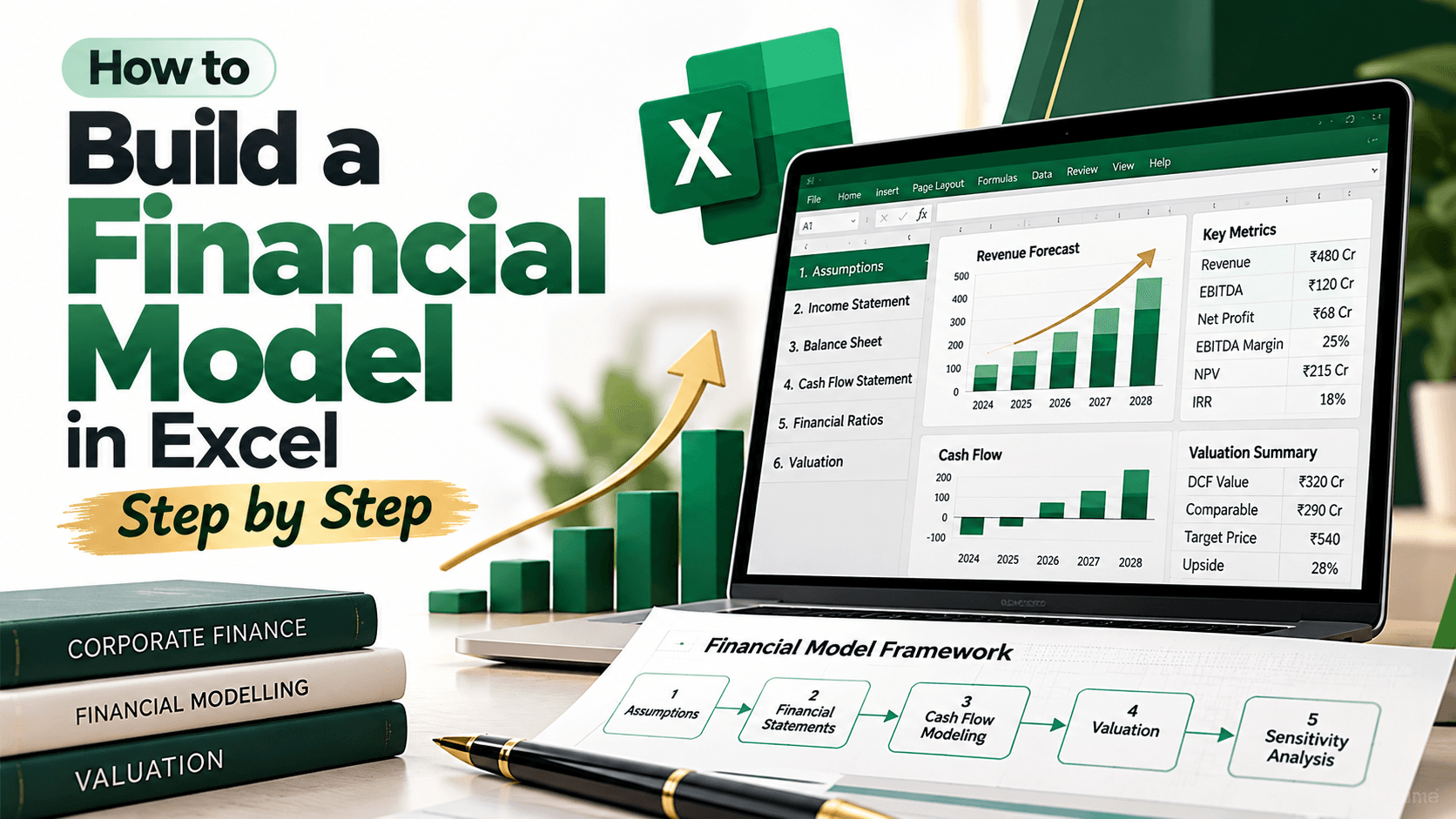

How to build a financial model in Excel, step by step
Financial modeling in Excel sounds more intimidating than it is. At its core, it’s a way to ask a simple question: what happens to the money if things go a bit better, or a bit worse? Most people can build a working model in an afternoon, provided they organise their thinking before they start typing formulas.
This guide uses one example throughout, a small coaching batch, so you can see every formula in context.
What a Financial Model Does ?
A financial model is a spreadsheet that tracks how money moves through a business. You enter your assumptions: how many customers you expect, what they pay, and what things cost. The model works out revenue, profit, and cash. Change one assumption and everything downstream updates.
Step 1: Keep inputs apart from formulas
Most beginner models get messy for one reason. Numbers and formulas are mixed together, so nobody knows what can be changed safely. Before you open Excel, split your workbook into three parts in your head. Inputs are every number you might want to change. Calculations use those inputs. Outputs summaries the answer. Put the inputs on one sheet and format them in blue font, so they stand out. Keep formulas in black.
Step 2: Set up the inputs
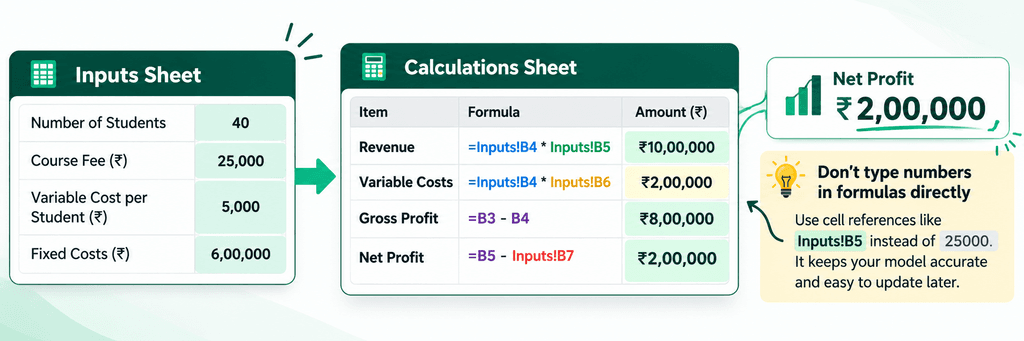
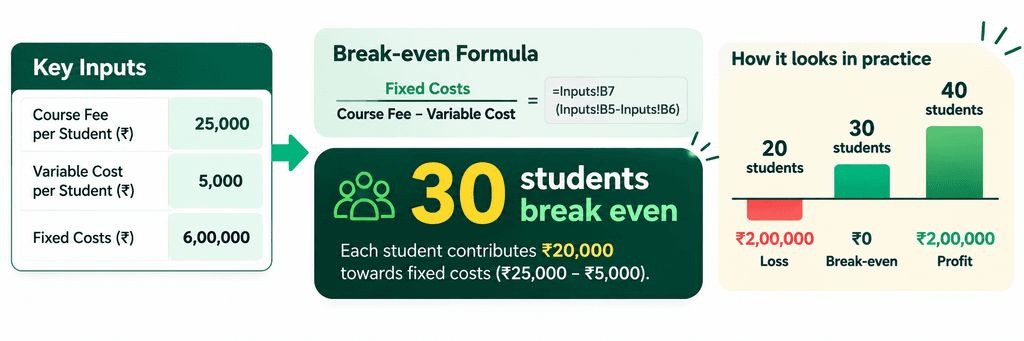
Our example is a coaching institute running one three-month data analytics batch. On the Inputs sheet, record four numbers: 40 students, a fee of ₹25,000 each, ₹5,000 of variable cost per student for study material and placement support, and ₹6,00,000 a month in fixed costs for rent and salaries. The split between variable and fixed costs matters. Variable costs rise with every student who enrols. Fixed costs are due whether the batch is full or empty. Every figure here is illustrative, so replace them with your own.
Step 3: Calculate revenue and profit
On a separate Calculations sheet, the formulas do the work. Revenue goes in cell B3 as =Inputs!B4*Inputs!B5, which returns ₹10,00,000. Variable costs go in B4 as =Inputs!B4*Inputs!B6, coming to ₹2,00,000. Gross profit in B5 is =B3-B4, or ₹8,00,000. Net profit in B6 is =B5-Inputs!B7, which leaves ₹2,00,000 after fixed costs.
Typing numbers straight into a formula feels quicker, but it isn’t. Write =40*25000 and the model goes wrong the moment the fee changes. Six months later, nobody will remember where the 25000 came from.
Step 4: Find the break-even point
Step 5: Add scenarios
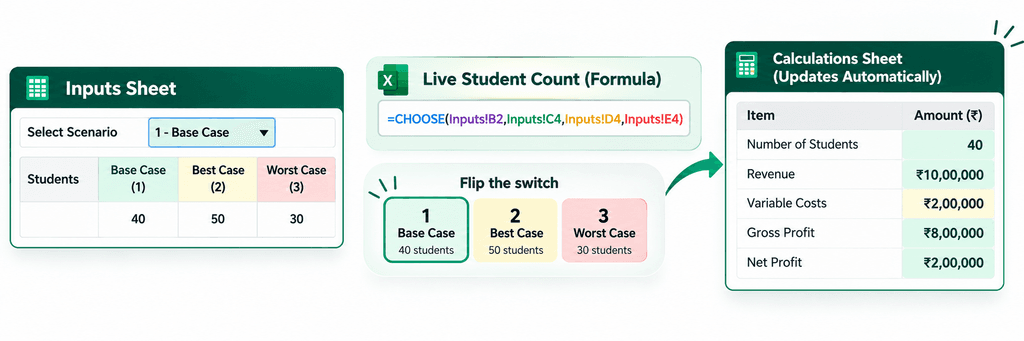
Batches don’t always fill. On the Inputs sheet, type 1 in B2 for the base case, 2 for the best case, or 3 for the worst. Put the student numbers for each case in cells C4, D4, and E4 (40, 50, and 30). Then let the live count pick the right one:
=CHOOSE(Inputs!B2,Inputs!C4,Inputs!D4,Inputs!E4)
Flip the switch and the whole model updates. You don’t rebuild anything.
Step 6: Test the model
Before you trust the model, try to break it. Set students to zero and check that the profit line shows a sensible loss. Use Formulas, then Trace Precedents, to confirm each cell pulls from the place you expect. Then add a check cell on the output sheet that compares its net profit with the figure on the Calculations sheet. If the two ever differ, something is linked wrongly.
Step 7: Build a one-page summary
The output sheet is for the person who won’t read the formulas. Keep it to one page, with monthly revenue, net profit, profit margin, the break-even student count, and a chart comparing profit across the three scenarios. If someone needs more than a minute to find the answer, simplify the page.
Mistakes to avoid
Hardcoding numbers into formulas is the big one, and we’ve covered it. Leaving out labels and units is close behind, because a figure with no unit could be rupees or thousands. Building something elaborate before the simple version works is another trap. And skipping the testing leaves you with a guess that looks like a forecast.
Where to start
Try this on something small first: a weekend workshop, a tea stall, or your own monthly budget. Set up the three sheets, enter real numbers, and find your break-even point. Once that feels routine, larger models are mostly the same steps repeated at a bigger scale.
If you’d like structured practice in analytics and financial analytics, Arivu Skills runs programmes in these areas, with branches in Bengaluru, Chennai, and Coimbatore. Drop in to any of them, and the team can tell you which path suits your goals.
FAQ
Do I need an accounting or finance background to build a financial model in Excel?
No. You need to understand what revenue, costs, and profit mean, and be comfortable with basic formulas. Accounting knowledge helps as models get more detailed, but you can start with the steps in this guide.
What’s the difference between a budget and a financial model?
A budget sets spending limits for a period. A financial model forecasts results over time and links each figure to an assumption, so changing one input updates the whole forecast.
Which Excel functions do I need to get started?
SUM, IF, CHOOSE, and cell references cover most beginner models. As your work grows, INDEX, MATCH, NPV, and IRR become useful for comparing investments.
What’s the difference between profit and cash flow?
Profit counts revenue when it’s earned. Cash flow tracks money actually received and paid out. A business can show a profit and still run short of cash if customers pay late. A simple cash flow section in your model makes that gap visible.
How many scenarios should a model include?
Three is enough for most beginners: base, best, and worst. More scenarios make the model harder to read without adding much insight.
How long does it take to learn financial modeling in Excel?
It depends on your starting point. Most people can build a basic model within a few practice sessions. Handling more complex models usually takes longer, with regular use on real problems.