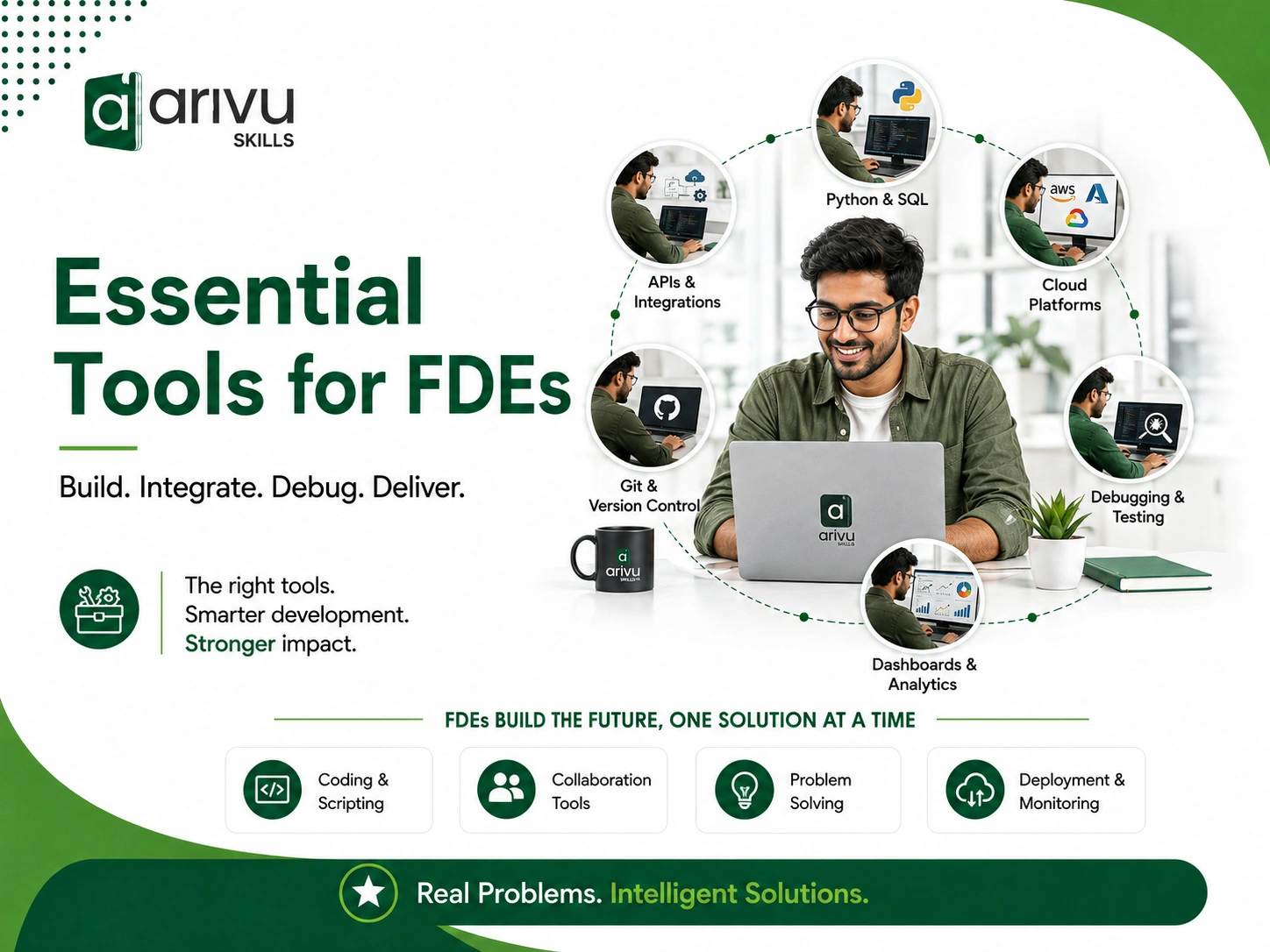

A forward deployed engineer’s toolkit isn’t a fixed list you memorize once. It changes depending on the client, the stack you’re dropped into, and how fast you need to ship something that actually works in front of someone watching. But there’s a core set of tools that show up again and again across FDE work, and if you’re preparing for the role or already in it, this is where to start.
Want structured, hands-on training in this exact toolkit? Our Forward Deployed Engineer Course in Bangalore walks through each of these tools with real client-style projects.
What forward deployed engineers actually do
Before the tools make sense, the job needs to. A forward deployed engineer sits between an engineering team and a client’s environment — often physically or contractually embedded on-site. The work is part software engineering, part systems integration, part translator between what a client says they need and what their data actually looks like.
That mix is why the FDE toolkit looks different from a typical backend or product engineering stack. You’re not just writing code in isolation. You’re pulling messy client data into a usable format, standing up something that works inside someone else’s infrastructure, and often demoing it the same week you built it.
Core tools every FDE should know
Programming and scripting
Python shows up more than anything else in FDE work, mostly because it’s fast to write and has a library for nearly every data problem you’ll hit — pandas for wrangling spreadsheets a client hands you, requests for talking to whatever API they’ve got. SQL is non-negotiable too; most client environments store their operational data in some relational database, and you’ll be querying it before you’ve even finished your onboarding paperwork.
Some FDE roles lean more heavily on Java or TypeScript depending on the platform you’re deploying into, so it’s worth checking what stack the specific role or client uses rather than assuming Python covers everything.
Version control and collaboration
Git is the baseline, but the part that actually matters for FDE work is discipline around branching and commit history — you’re often collaborating with a distributed team while also needing to roll back fast if something breaks in a live client environment. GitHub or GitLab handle the hosting side, and pull request review habits become more important than usual because you might be the only engineer physically present to catch a mistake before it hits a client’s system.
Containers and deployment
Docker is close to standard at this point — packaging an application so it runs the same way on your laptop as it does inside a client’s server rack saves a huge amount of on-site troubleshooting. Kubernetes comes into play once you’re managing multiple services or need the deployment to scale, though plenty of FDE engagements never need anything past Docker Compose.
Terraform or similar infrastructure-as-code tools matter when you’re setting up cloud resources repeatedly across different client environments. Writing the setup once and reusing it beats manually clicking through a console every time you land at a new site.
APIs and integration testing
Postman (or Insomnia, if that’s your preference) is where most FDEs spend a surprising amount of time. Client APIs are rarely documented the way you’d hope, so testing endpoints, checking auth flows, and figuring out response shapes before you write a single line of integration code saves hours of guessing later.
Cloud platforms
AWS, GCP, and Azure all show up depending on where the client already lives. You don’t need mastery of all three, but comfort with the CLI tools, IAM permissions, and basic networking concepts for whichever platform is in play will save you from a lot of “why can’t this service talk to that one” afternoons.
Monitoring and debugging
Once something is deployed, you need to know if it’s actually working. Datadog, Grafana, or a client’s existing monitoring stack become your early warning system. Just as important: comfort with reading logs directly, because plenty of client environments don’t have polished dashboards set up yet — that might literally be part of what you’re there to build.
Documentation and knowledge transfer
This one gets overlooked constantly. An FDE who solves a problem but leaves no trace of how they solved it hasn’t finished the job — the client’s own team needs to maintain what you build after you’re gone. Notion, Confluence, or even a well-organized README go a long way. Clear documentation is also, honestly, what separates a good FDE from someone who just gets lucky once.
Want to understand the role better? Read our complete guide on What Is a Forward Deployed Engineer?
Communication tools
Slack or Microsoft Teams for the day-to-day back-and-forth, Zoom or Google Meet for the client calls where you’re explaining a technical decision to someone who isn’t technical. Being able to translate what you built into plain language, on the spot, is as much a part of the job as the code itself.
Nice-to-have tools that give you an edge
- Jupyter notebooks — useful for quick data exploration before you commit to a permanent solution
- dbt — if the client’s data problems lean toward transformation pipelines rather than application code
- Figma — occasionally handy for sketching a UI concept during a client discussion, even if you’re not the one building the frontend
- Linear or Jira — for tracking your own workstream when a client doesn’t already have a system you’re plugged into
None of these are dealbreakers if you don’t know them going in. They’re the kind of thing you pick up fast once you’re actually working on a client engagement.
How to actually build proficiency, not just familiarity
Reading a list of tools won’t make you good at using them under pressure. What helps:
- Pick one client-style project and build it end to end — data ingestion, transformation, deployment, and a working demo.
- Practice explaining technical decisions out loud, not just writing good code. FDE interviews and real engagements both test this.
- Get comfortable with ambiguity. Client requirements are rarely as clean as a product spec. Practice working from incomplete information.
- Learn to read someone else’s messy codebase or database quickly — you’ll rarely start from a blank slate.
The tools matter, but they’re not the hard part. The hard part is using them under real client pressure — incomplete requirements, someone else’s legacy systems, and a demo deadline that doesn’t move.
FAQs
FDE stands for forward deployed engineer — an engineer who works directly at or with a client’s site to implement, customize, and deploy software solutions in the client’s own environment.
Python is the most commonly used language in FDE work because of its speed for data manipulation and scripting, though the exact requirement depends on the client’s tech stack.
Docker isn’t always mandatory, but it’s widely used because it makes deployments consistent across different client environments, which is a core part of the job.
A regular software engineer typically builds for an internal product roadmap. An FDE builds and adapts solutions directly inside a client’s environment, often combining engineering, systems integration, and client communication in a single role.